Takeoff software
built for the way
you price work.
Professional takeoff software, in your browser.
- Excel bill of quantities: take off straight into your own cells
- Revision compare: overlay old and new, changes clouded for you
- Scale Zones: several scales on one sheet, each measured right
- Lengths, areas, counts, volumes to Excel, CSV or marked-up PDF
Every feature on every plan. Nothing to install.
Full access from day one · no card, no commitment · sign up in 30 seconds
Half the price of the big desktop tools · Works on locked-down corporate IT · Nothing to install
Built by an estimator, for estimators
Tracer Takeoffs is built by a qualified quantity surveyor, estimator and construction business owner with 25+ years on the tools — so it works the way you actually price a job, not how a software team imagines you do.
 Meet the founder →
From drawing to priced bill, in one place
Upload your drawings
Drag in a project's worth of PDFs — even big multi-page sets. Everything's organised by job.
Set scale & measure
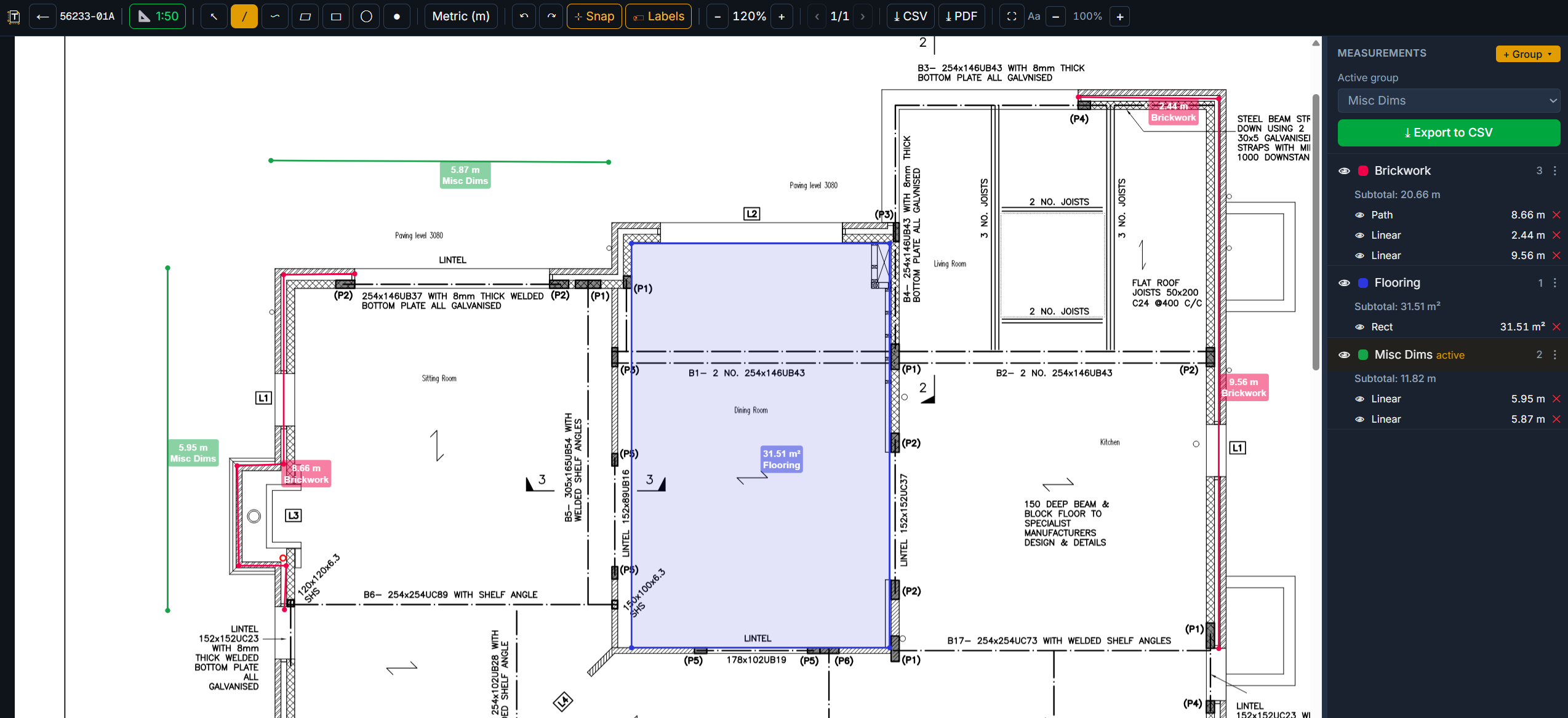
Calibrate off a known dimension or pick a preset, then measure lengths, areas and counts.
Group, link & export
Group your takeoffs with running totals, link them to your Excel BoQ, and export CSV or a marked-up PDF.
Everything you need to take off a job
Not a cut-down web viewer. The measuring, scaling, revision and bill-of-quantities tools of the desktop packages, in your browser, on every plan — including the free trial.
Measure anything
- Lengths, paths that turn corners, areas, rectangles, circles and counts
- Snap to existing points for clean joins
- Roof pitch turns a flat plan into the true sloped area
- Depth gives volumes; height gives wall areas, from one measurement
- Deductions for openings and voids, counted as a minus like a written ddt
Scale it right
- Calibrate from a known dimension, or pick a ratio from 1:5 to 1:2500
- Per sheet or all sheets — mixed-scale sets stay right
- Scale Zones: box a 1:20 detail on a 1:100 plan and it measures at 1:20
- Zones inside zones; a scale badge on every measurement; warnings on the edge
- A sheet re-plotted at a different size tells you to check the scale
Keep up with revisions
New- Upload the new issue onto the same drawing — your measurements carry over
- Compare issues with a slider, or an overlay: old in red, new in blue
- Find changes draws revision clouds round what moved — a checklist you tick off
- CHECK tags on measurements that sit in a change; counts in the register
- Print the comparison as its own PDF for a claim or a quote pack
Organise and style
- Colour-coded groups with running totals, reusable across every sheet
- Seven line widths per measurement, per group or for the whole drawing
- Eight hatch patterns for areas; labels you can show, hide and position
- Ctrl+click to restyle several at once; right-click for the lot
- Text notes on the sheet, in your words; turn a sideways sheet a quarter at a time
Export, client-ready
- Excel bill of quantities: bring yours in, take off straight into its cells, export it back complete
- CSV with subtotals, and a whole-job roll-up by group name
- Marked-up PDF: measurements, labels, zones, clouds and notes flattened onto the drawing
- Hatching and widths print exactly as you see them
- Download all of your data at any time
Works anywhere, for anyone
- 100% in the browser — nothing to install, works on locked-down corporate IT
- Your jobs saved securely in the cloud; open them from any machine you sign in on
- 50 GB of drawings on every plan, trial included
- Metric or imperial; priced in pounds, dollars, euros and more
- Team seats for firms with more than one estimator
Support from the estimator who built it
Tracer Takeoffs is run hands-on by its founder — a qualified quantity surveyor and estimator with 25 years on the tools, still pricing jobs. Questions go to someone who knows what a bill of quantities is for, not a ticket queue.
Customers shape the product: Scale Zones, line thickness for whole drawings and multi-select were all asked for by estimators using it, and shipped within days.
Teams: more than one estimator?
Buy seats for your firm on one bill and every seat is cheaper from the second one: 10% off for 2–4 seats, 15% for 5–9, 20% for 10 or more. Each estimator gets their own full account; seats move to a replacement when someone leaves.
Simple pricing that undercuts the market
Start with a 15-day free trial — no card required.
Prices include sales tax where it applies. You'll pay in US dollars — checkout shows your currency before you pay. Cancel anytime.
Questions
Is there really a free trial?
Yes — 15 days with full access and no card required. It doesn't auto-charge; you only pay if you choose to subscribe.
Do I need to install anything?
No. Tracer Takeoffs runs entirely in your browser, so it works even on locked-down corporate IT that blocks software installs.
Can I use my own Excel bill of quantities?
Yes — bring in your own BoQ, take off straight into it, and export it back out complete and client-ready.
Can I make the measurement lines thicker?
Yes. The Line thickness button in the toolbar (or press W) sets the width for one measurement, a whole group, or the entire drawing in one go — and every drawing you haven't measured yet starts at that width, on whichever computer you sign in on. Hold Ctrl and click to select several measurements and change their width, colour or hatch together.
What happens when a drawing is revised?
Upload the new issue onto the same drawing and your measurements, scale and groups carry over as they are; the old file is kept, so you can look back or revert. Compare the two with a slider or a red/blue overlay, and Find changes draws revision clouds round what moved — a checklist you tick off, with a CHECK tag on any measurement that sits in a change. The comparison prints as its own PDF.
Can one sheet have more than one scale?
Yes — set the sheet scale, then draw a Scale Zone round any detail drawn at another scale, say a 1:20 section on a 1:100 plan. Everything measured inside it uses that scale, the rest of the sheet keeps its own, and your CSV, PDF and BoQ all follow.
How does the price compare?
Roughly half the price of the established desktop tools, plus a pay-per-project option for occasional use.
How much storage do I get?
50 GB on every account — including the free trial. That's roughly 5,000 typical PDF drawings, more than most estimators upload in years of takeoff work. If you ever genuinely need more, message Support and we'll raise it.
Is my data secure?
Your drawings and takeoffs are stored securely in the cloud, scoped to your account, and never shared.
Start taking off in minutes
15-day free trial · no card needed · nothing to install — it runs in the browser, even on locked-down corporate machines
Start your free trial →